Revealing Data, Reviving the Idea of Virtual Mobile Devices

The concept of a virtual mobile device isn’t new. Now may be the time to revive that idea to keep phones from revealing data they shouldn’t. The idea for such capabilities goes back to before 2011 when it was announced that Verizon and VMware were working on “Dual Identity Smartphones.” This was one of the BIG things discussed in the EUC space during that VMworld. Now it may be worth reconsideration.

Copilot. (2026). Ghostly spirits escaping a collapsing smartphone interface in Soviet-style propaganda illustration [AI-generated image]. Microsoft Copilot.

Having phones with multiple, or seemingly multiple personalities could be beneficial. Not necessarily from a technology standpoint, as the concept is over 15 years old. Instead the benefits come from security and political concerns that are now more prevalent than they were when this concept was first developed.

Burner Devices

It is a common practice for business people traveling to certain countries to receive a ‘burner’ phone and laptop with minimal access to corporate assets. The list of countries where this applies has grown in the last couple of years, increasing the need for security at organizations and for individuals. Typically when folks return these ‘burner’ devices, they are wiped and ‘hopefully’ destroyed. This is to ensure any possible surveillance systems that ‘accidentally’ got installed on them while out and about are mitigated. The idea being that it may not be possible to tell if the device was tampered with, so let’s not take any chances.

This technology would also make phone upgrades/replacement so much easier. Because the phone is now a VM, the underlying hardware could be replaced with minimal disruption enabling a consistent user experience. Additionally, if for some reason the mobile device was lost or stolen, the information is not compromised. It could be recovered from the safety of a data center. Not to mention all the program isolation and sandboxing that could be done. It brings so many benefits to users and organizations alike.

An Example

Let’s look at an example of this, you fly to a country that surveilles foreigners entering the country (pick your country, I can think of 3 without even trying). As you go through security to entry one of these countries, your electronic devices are inspected. The security detail powers up your laptop and has you login, they poke around. They have you unlock your mobile device and do the same, inspecting and downloading any data resident on the device they wish (see ‘advanced search’).

Copilot. (2026). Sinister officer inspecting smartphones in Soviet-style propaganda illustration [AI-generated image]. Microsoft Copilot.

They clear you and you move on with your day. Only ever since your phone hasn’t been the same. The ‘security’ team ‘infected’ your mobile device with something. Spyware, malware, tracking, worms, who knows what. The same with your laptop. If you refuse to allow an ‘inspection’ of these devices you might be detained or refused entry. This is the reason for burner devices.

This is also why VDI is so important for corporate users. Your files and materials are all safely locked away in your country of origin and not present on the device. There is nothing for all that malicious software or prying eyes to see. Only right now, this isn’t entirely true for mobile devices like cell phones. And arguably, they are becoming more important in protection strategies. They have become the life blood for many and contain as much if not more important information (think contacts, appointments, and text messages) than a laptop.

Time to Revive Virtual Mobile Devices?

For these and many other reasons, I feel the idea of virtual mobile devices might be worth reviving. I started thinking about this and outlined this blog post as I was flying back from VMware Explore 2025, where I’d heard stories from several who came for the conference regarding their journey through United States Customs. Needless to say, I found it disturbing.

There are ways to deliver applications to users mobile devices for organizations where IT can geofence the applications so they uninstall or wont run or contain data in certain areas. This is good for some business applications. But…

As I sat on my flight back from VMware Explore I see some scenarios where it maybe more appropriate to have a full virtual mobile device, so things aren’t cached. With reports of USCB demanding full reviews of travelers mobile devices it might be better to have a fully separate virtual mobile device, that way when you land you disconnect from your virtual mobile device, and there is nothing to see. 

What a Virtual Mobile Device (VMD) Looks Like

You might wonder what the technical design of a VMD would look like. Let’s break it down really quickly. There are a couple of ways to deliver them, one is to use an ARM emulator on an x86 platform, the other is to have a cluster of ARM servers capable of delivering a native mobile OS using virtualization technologies. These would of course be virtual machines and could easily be deployed in a number of different configurations including something like Omnissa’s Instant Clone technology. Where the mobile user environment is rebuilt each time from a base image. Or it could be a static VMD where it exsists as a persistent image.

Then, the user just connects to their VMD from their phone when needed and they disconnect prior to entering locations subject to inspection. This would be handled using a broker like, Omnissa Horizon. The result being, a separated mobile device experience.

Other VDM Considerations

There are also a few other things to consider with this. What about SIMs, phone calls, cameras, and other functions of most modern mobile devices. The SIM can be addressed in one of two ways, a virtual SIM or it can be linked back to a hardware SIM in the data center where the VMD resides. Everything else could easily be passed through.

Additionally, things like facial recognition could continue to work seamlessly by creating a two way trust and key-chain pairs between the mobile device and VDM. The recognition system functions similarly to how it works now, only the trust is first established with the VDM, and the VDM then establishes the trust with the application.

(At this point you’ve probably figured out, that at least for the time being, this would preclude IOS based VMDs. This is mainly due to licensing restrictions.)

ARM Hosts

You might also be thinking that ARM isn’t available on any mainstream virtualization platforms. That’s not entirely true. At VMware Explore this last year there was a session on delivering ARM VMs through VMware VCF. You can watch it here: VMware Cloud Foundation on Arm: Where We Are and Where We’re Headed [CLOP1126LV] 

If a vendor would bring together all the work from the past, they could create a powerful sandbox where all (application, data, etc.) remains in a sovereign data center and make a mint. And if done well they could commercialize it. Imagine you no longer need to fear losing your phone and all the pictures on it, or someone stealing it.

You might be thinking apps can just be delivered using existing methods with similar outcomes. Just think about how long it takes to restore everything following a reset of your phone. There are a lot of ways to deliver the individual apps, we could make it simpler by delivering the whole mobile environment.

It Just Makes Sense

A “burner phone” that maintains a consistent user experience might be overkill for some. However, with unlimited data, minimal dead spots, and the fact that most mobile devices first purpose is no longer phone calls (when was the last time you heard someone asking “can you hear me…”), isolating data operations using VDMs just makes sense.

This would also mean the data that organizations (or individuals) do not want disclosed to governments or others for whatever reason could be safely disassociated from the mobile device. Completely severed, because there is technically nothing kept on the device.

If this became wide spread, it would become almost pointless for bad actors to request a review of a mobile device. The data is out of their grasp kept safe in a data center, and only streamed to and from the mobile device.

Furthermore, organizations could establish geofences around known areas of device intrusion where it is not possible to connect to VMDs. This ensures that private data remains private and privileged. It also forces bad actors (nation state or otherwise) to show more respect to the privacy of individuals. It could still be possible to use the mobile device to make phone calls if needed, just not opening the kimono wide enough to see all the private data.

Plus, when someone returns from a country with such surveillance on visitors, the end user can dispose of their “burner” devices with minimal disruption, without revealing their data. The old is new again!

Copilot. (2026). Joyful crowd discarding smartphone into flaming trash can in Soviet-style propaganda illustration [AI-generated image]. Microsoft Copilot.

Permanent link to this article: https://www.wondernerd.net/revealing-data-reviving-the-idea-of-virtual-mobile-devices/

VCF and VVF 9 New GPU Management Scripting with PowerShell and Python [CODEQT1767LV]

VCF and VVF 9 introduce some new methods for managing GPUs both in the GUI and through code such as PowerShell and Python. I presented on this at VMware Explore in a VMware {Code} session CODEQT1767LV. Here are are the details on whats new with GPU management in vSphere 9 from my session.

The biggest addition in GPU VCF and VVF are DirectPath Profiles. Direct Path Profiles or DPPs when vGPU profiles were added to them in 9.0. They provide a view of how the GPUs in your environment are being consumed. For example, lets say I have 10 NVIDIA GPUs in a cluster. At a cluster level I can see the combined consumption of vGPU profiles on everything in the cluster or I can drill down and look at consumption at a host level.

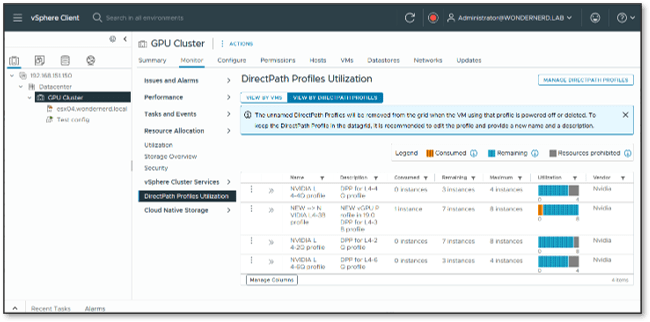
Bellow is a screen capture of what this looks like in vCenter.

In this image from my home lab you can see that DPPs are located under the monitoring section for both clusters and hosts. In use in the environment is one GPU consuming a NVIDIA L4-3B profile. We can see how that impacts the other profiles as well as the remaining number of each profile defined that are available.

Justin Murry did a fantastic blog on DPPs. To get a full understanding of what one is and how it works I recommend a quick read of his blog post.

CODEQT1767LV

Now let’s dig into why you are probably here and what I was presenting on. Interacting with DPPs. Below is a link to my slide deck that I presented at Explore and when the video posts, I will link that here as well.

Again the session will be linked once it is posted.

The MOB

With 9.0 the Managed Object Browser or MOB is disabled by default. This may not sound like a big deal to those who don’t do much coding for virtual environments. But for those of us who relish this, you’ll find that you spend a lot of time in the MOB looking up structures, functions, and paths.

Let’s quickly talk about enabling that. Broadcom KB 401669 provides details of how to enable the MOB. This is a rather straight forward task of modifying the vpxd.cfg file on the vSphere environment you want to enable it from.

There are a couple of things that need done first though. You’ll need to enable BASH shell access and (optionally) SSH access to the vCenter. This is so you can actually get to the vpxd file. Then you open up your favorite editor, in my case VI, and change the value of <enableDebugBrowse> to true. Only my instance didn’t have the <enableDebugBrowse> in the vpxd file, so I had to add it. I added it right under the <hostnameUrl> and it appears to work just fine. Here’s a screen shot of what that looks like.

Once the value has been set to true or added, save the vpxd.cfg file and restart the vpxd service. Then you’ll have MOB access.

If you would like to find DirectPath Profiles in the MOB. From the [home] location go to the content section, then select directPathProfileManager and you can see all the functions exposed for it. It should look like the screenshot below.

VCF PowerCLI Scripting

As you can see above there are five functions for DirectPath Profiles. One creates, one modifies, and one destroys, the other two are the interesting ones. These are the two I will focus on the Capacity and the List functions. These are the most valuable for scripting and automation. The other three are less impactful for development purposes as they tend to be one and done.

DirectPathProfileManagerList()

Let’s start simple with getting a list of DPPs. The code to do this is straight forward. I establish a connection to my vSphere environment and use the following code:

#------------- List all DPP specs -------------
$DPP_MGR = Get-View -Id 'DirectPathProfileManager-DirectPathProfileMgr'
$Spec = New-Object VMware.Vim.DirectPathProfileManagerFilterSpec
$DPP_MGR.DirectPathProfileManagerList($spec)

This code block has 3 lines to it. First we create a view of the DirectPathProfileManager and assign it to a variable. Next we create a new DirectPathProfileManagerFilterSpec or specification and assign it to a $Spec value. This is basically a filter object that allows us to specify what we are looking for. Lastly we use the DirectPathProfileManagerList function of our view and pass it the DPP spec we created in the previous line. When we run this we get the following output:

Id           : QML5Zhf++WjN2WcyOgEeNyzTdatxaAHj
Name         : NVIDIA L4-4Q profile
Description  : DPP for L4-4Q profile
VendorName   : Nvidia
DeviceConfig : VMware.Vim.DirectPathProfileManagerVmiopDirectPathConfig


Id           : LZYJZ1jfbn9zSli2xwatXrvO7FICWh+z
Name         : NEW --> NVIDIA L4-3B profile
Description  : NEW vGPU Profile in 19.0
               DPP for L4-3B profile
VendorName   : Nvidia
DeviceConfig : VMware.Vim.DirectPathProfileManagerVmiopDirectPathConfig


Id           : 3QuKKcBqBXRj1oF/fAwUAcjUXX5qWpio
Name         : L4-1Q profile
Description  :
VendorName   : Nvidia
DeviceConfig : VMware.Vim.DirectPathProfileManagerVmiopDirectPathConfig


Id           : ibQrFoQHGzIfYVVhQt9YZLTLyi2FYGnU
Name         : NVIDIA L4-2Q profile
Description  : DPP for L4-2Q profile
VendorName   : Nvidia
DeviceConfig : VMware.Vim.DirectPathProfileManagerVmiopDirectPathConfig


Id           : ucbsCQSDIl3CHG5b2WGDvfADuCUorM8t
Name         : NVIDIA L4-6Q profile
Description  : DPP for L4-6Q profile
VendorName   : Nvidia
DeviceConfig : VMware.Vim.DirectPathProfileManagerVmiopDirectPathConfig

It’s all the DPPs defined in the environment. This can be helpful when you need to know names or objects in the environment. You can iterate through the list and get details for each DPP.

Wouldn’t it be great if we could filter the list, find just the vGPU profile we are interested in? We can do that! Remember that $Spec variable we created in the previous PowerShell script? We’re going to use it now to filter our list to just a single DPP.

#------------- List specific DPP specs -------------
$DPP_MGR = Get-View -Id 'DirectPathProfileManager-DirectPathProfileMgr'
$Spec = New-Object VMware.Vim.DirectPathProfileManagerFilterSpec
$Spec.Names = 'NEW --> NVIDIA L4-3B profile'  #Accepts single items or arrays
$DPP_MGR.DirectPathProfileManagerList($Spec)  

In the above code block you’ll see that we added one new line. We added the $Spec.Names and set the value to a profile name. This allows filtering for only a specific DPP. This will come into play in a moment. The output from this code block looks like the following:

Id           : LZYJZ1jfbn9zSli2xwatXrvO7FICWh+z
Name         : NEW --> NVIDIA L4-3B profile
Description  : NEW vGPU Profile in 19.0
               DPP for L4-3B profile
VendorName   : Nvidia
DeviceConfig : VMware.Vim.DirectPathProfileManagerVmiopDirectPathConfig

DirectPathProfileManagerQueryCapacity(Target, Capacity_Query)

What we did was pretty cool, still not very useful on its own. Let’s step it up and do some capacity queries. This is where the usefulness starts to show. The capacity queries give us the utilization of our GPUs that we see in the GUI. Let’s start with the Cluster level and se what’s happening across all the hosts. This code snipit is a bit longer than the previous one but uses much of what we just saw.

$DPP_MGR = Get-View -Id 'DirectPathProfileManager-DirectPathProfileMgr'
$Spec = New-Object VMware.Vim.DirectPathProfileManagerFilterSpec
$Spec.Names = 'NEW --> NVIDIA L4-3B profile' 
#vSphere Cluster
$Cluster_View = Get-View -ViewType ClusterComputeResource -Filter @{"Name" = "GPU Cluster"}
#DPP Cluster
$DPP_Target_Entity = new-object VMware.Vim.DirectPathProfileManagerTargetCluster
$DPP_Target_Entity.Cluster = $Cluster_View.MoRef
#Target
$DPP_QC = New-Object VMware.Vim.DirectPathProfileManagerCapacityQueryByName
$DPP_QC.Name = $spec.Names
$DPP_MGR.DirectPathProfileManagerQueryCapacity($DPP_Target_Entity, $DPP_QC)

The first three lines should look familiar from the previous code blocks. Next we need to get our cluster object that we want to get DPP details from. We do this with a get-view call. Now we are going to create a target object with a type of DirectPathProfileManagerTargetCluster. We then set the cluster value to the MoRef of our cluster.

Using the MoRef of our cluster is important, as the query capacity function only operates with full objects.

Lastly we create our capacity query object and pass it the Spec we created on line two and set on line three. This gives us the following output:

Profile           : VMware.Vim.DirectPathProfileInfo
Consumed          : 1
Remaining         : 7
Max               : 8
UnusedReservation : 0

It shows how the specific vGPU profile is being consumed. Now we’re getting somewhere! We should see how we can query a specific host. That’s what this next block of code does.

$DPP_MGR = Get-View -Id 'DirectPathProfileManager-DirectPathProfileMgr'
$Spec = New-Object VMware.Vim.DirectPathProfileManagerFilterSpec
$Spec.Names = 'NEW --> NVIDIA L4-3B profile'  
#vSphere Host
$Host_View = Get-View -ViewType HostSystem -Filter @{"Name" = "ESX04.wondernerd.local"}
#DPP Host
$DPP_Target_Entity = new-object VMware.Vim.DirectPathProfileManagerTargetHost
$DPP_Target_Entity.Host = $Host_View.MoRef
#Target
$DPP_QC = New-Object VMware.Vim.DirectPathProfileManagerCapacityQueryByName
$DPP_QC.Name = $spec.Names
$DPP_MGR.DirectPathProfileManagerQueryCapacity($DPP_Target_Entity, $DPP_QC)Now lets look at a specific host. 

If you look this code block, at first glace it probably appears identical to the previous block. In reality we made two minor changes when we want to look at DPP for a specific host. We changed lines 5, 7, and 8. First we get a view containing our host on line 5. Then we call DirectPathProfileManagerTargetHost on line 7, and set the .host value on line 8. Everything else is the same as the cluster level. Which provides the following output:

Profile           : VMware.Vim.DirectPathProfileInfo
Consumed          : 1
Remaining         : 7
Max               : 8
UnusedReservation : 0

We can see that this host has one L4-3B profile consumed on it and can support 7 more. Now we have a complete set of tools to work with. Now we are going to make this do some cool stuff.

Something Useful

This is sort of useful. There are several things we can do at this point. We can use this to optimize VM placement for vGPUs, for example, I want all the L4-3B vGPUs consolidated on the same host, or maybe I want to use this with a VDI by day compute by night scenario, or something else. The possibilities are really endless. In this case I’m just going to share a simple script that just powers up several VMs until it reaches a specific amount of GPU capacity and then shuts them down.

$DPP_MGR = Get-View -Id 'DirectPathProfileManager-DirectPathProfileMgr'
$Spec = New-Object VMware.Vim.DirectPathProfileManagerFilterSpec
$Spec.Names = 'NEW --> NVIDIA L4-3B profile'  #Accepts blank, single, or arrays
#vSphere Host
$Host_View = Get-View -ViewType HostSystem -Filter @{"Name" = "ESX04.wondernerd.local"}
#DPP Host
$DPP_Target_Entity = new-object VMware.Vim.DirectPathProfileManagerTargetHost
$DPP_Target_Entity.Host = $Host_View.MoRef
#Target
$DPP_QC = New-Object VMware.Vim.DirectPathProfileManagerCapacityQueryByName
$DPP_QC.Name = $spec.Names

#Priming Read
$DPP_Usage = $DPP_MGR.DirectPathProfileManagerQueryCapacity($DPP_Target_Entity, $DPP_QC)

Write-Output("Setting Vars:")
$Reserve_VM_Space = 2
$VM_Floor = 0
$Starting_VM = $DPP_Usage.Consumed + 1

Write-Output("Starting Loop")
Write-Output("DPP Remaining: " + $DPP_Usage.remaining)
Write-Output("Reserved Space: " + $Reserve_VM_Space)
while ($DPP_Usage.remaining -gt $Reserve_VM_Space) {
    #Create VM Name
    $VM_Name = "VM_GPU_0" + $Starting_VM
    Write-Output("Starting VM: " + $VM_Name)
    $Next_VM = Get-VM -Name $VM_Name
    Start-VM -VM $Next_VM
    $DPP_Usage = $DPP_MGR.DirectPathProfileManagerQueryCapacity($DPP_Target_Entity, $DPP_QC)
    $Starting_VM = $Starting_VM + 1
}
Write-Output("No more VMs to start. Cleaning up") 
Start-Sleep -Seconds 20
Write-Output("Starting Value is: $Starting_VM")
while ($DPP_Usage.remaining -gt 1 -and $Starting_VM -gt 1){
    $Starting_VM = $Starting_VM - 1
    #Create VM Name
    $VM_Name = "VM_GPU_0" + $Starting_VM
    Write-Output("Stoppinng VM: " + $VM_Name)
    $Next_VM = Get-VM -Name $VM_Name
    Stop-VMGuest -VM $Next_VM -Confirm:$false
    if ($Starting_VM -gt $VM_Floor){
        do {
            Start-Sleep -Seconds 5
            $Next_VM = Get-VM -Name $VM_Name
            $VM_Power = $Next_VM.PowerState
            Write-Output("The power state is: " + $VM_Power)
        } until ($VM_Power -eq "PoweredOff")
    }
    else {
        Write-Output("Reached the floor. Bye!")
        break
    }
    $DPP_Usage = $DPP_MGR.DirectPathProfileManagerQueryCapacity($DPP_Target_Entity, $DPP_QC)
}

Everything until the priming read looks identical to what we had seen previously. From there it gets into basic coding. We have a loop that goes through and counts up as we start more VMs. Each time it checks to see what the new DPP numbers are and goes until it reaches the capacity set.

We then wait 20 seconds for all the VMs to fully come on line, at which point we start powering them down. And that loops through shutting down the VMs. Here’s a video of what running the code looks like.

That brings us to the end of this blog. I’m going to cover the python version of this code in another blog as there are still some things being worked out. In summary DPPs are an awesome addition to VCF and VVF 9.0. You should check them out!

Permanent link to this article: https://www.wondernerd.net/vcf-and-vvf-9-new-gpu-management-scripting-with-powershell-and-python-codeqt1767lv/

Make Room for Another End User at the EUC Table

Last week (August 4th through the 7th 2025) I attended the EUC World conference. It was a great time where I got to nerd out on all things end user computing (EUC). I realized on Wednesday that soon, we nerds will be adding another end user to the EUC table.

Visionary

I’m going to start by prefacing this with, when I have these moments of inspiration, they take about six years or more to become mainstream. For example, at GTC17, I had the idea of and started working on how to create a GPU based storage system, and this year Jensen started talking about all the storage vendors working on it. Additionally, there is VDI by day compute by night, which has just recently had key parts incorporated into major hypervisors, I was working on it before 2018. The same is true with vGPU based developer virtual desktops. It was the topic of my 2018 NVIDIA GTC breakout session and it’s now all the rage.

So, if history is any indication, what I’m about to discuss will be the big thing for EUC and AI around 2031, maybe sooner as hot as AI is right now. We will just have to wait and see.

What is this new EUC user?

You’re probably wondering what this new user type is that’s going to take EUC and AI by storm is. Simply put, it will be an agentic agent user. For those unfamiliar with the concept of agentic agents, all the geeks on TV keep talking about how these AI agents will be able to do things for you, like book dinner reservations, or hotels, schedule meetings, and other mundane tasks. This will make you a manager or conductor of many of these agents, telling them what you need, and they will go out and do it for you. In the coming years you may have 1, 3, 10, or hundreds of these agents at your beck and call making you more productive.

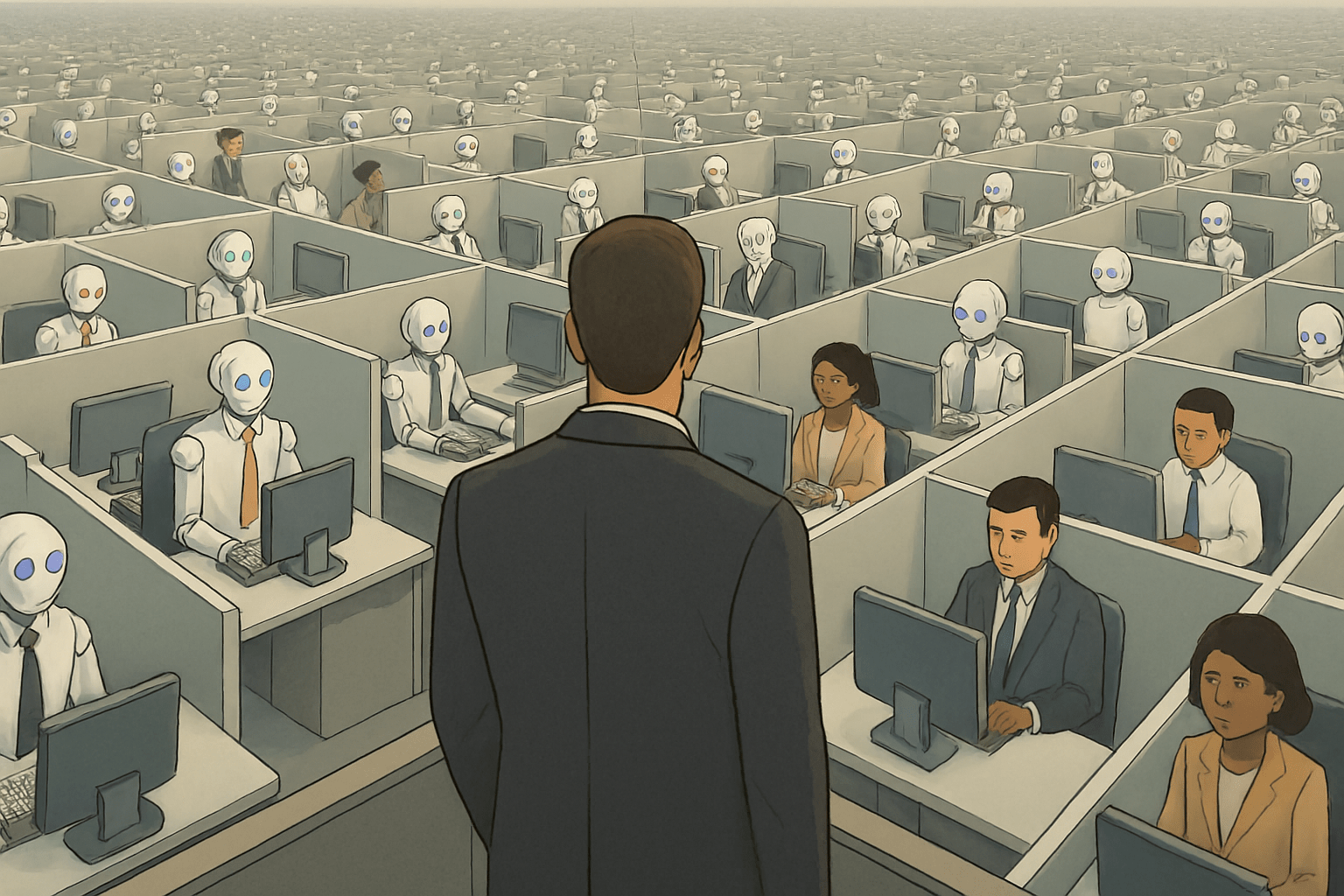
Humans and robots working in cubicles with virtual desktops delivered by EUC as someone looks out over the vast expanse of users. 

This image is AI generated using the following prompt in Copilot:

Create a digital illustration of a vast office landscape filled with hundreds of cubicles stretching to the horizon. Each cubicle is separated by light gray walls and contains either a humanoid robot or a human worker seated at a desk with a computer. Approximately 80% of the cubicles should contain robots, and 20% should contain humans. The robots should vary in eye color (e.g., blue, green, amber, violet) and some should wear ties to resemble office attire. The humans should be dressed in typical business clothing. The humans should be both male and female. The humans should represent different nationalities. There should be only one human or robot per cubical. In the foreground, include a person standing in an elevated position, looking out over the cubicle grid as if surveying the scene. The overall tone should be muted and professional, with soft lighting and a sense of depth created by the receding cubicles.

If you are grounded in present day reality, you’re probably thinking that agentic agents use the same interfaces and systems that we use, they don’t need anything different. If we ask an agentic agent to book a hotel for the next EUC World, the agent will query the web, to find out where EUC World is, then looks for hotels in the area on Google or another system, next it selects the optimal hotel, uses the hotels booking system, and books it for me.

This sounds like a regular user? We don’t need a different user type for this? They can just use a regular system? Right? Right? RIGHT?

Today’s EUC isn’t optimal

They can, but it’s not optimal. For example, if I give an architect a virtual desktop designed for an accountant and tell them to create a new facility. They can probably do it, but it won’t be efficient or easy to do. You want to give the end user the best tools to do their job.

The same holds true, in the future, for these agentic agents. They don’t need a mouse, meta data will be important, they aren’t as susceptible to marketing ploys, and well pop-ups for car insurance won’t really work. They will need new “desktops” optimized for them to use.

Possibilities

The first generation of agentic agents are just now being developed. They are trying to get them to accomplish tasks correctly and until that happens optimized workspaces are not going to exist for agentic agents.
When that happens a whole new set of ponderances will emerge:

  • Will all agents use the same type of workspace? (I seriously doubt it.)
  • How will these new workspaces be licensed?
  • Will a given number be included per human seat, so for every user they get x number of agentic agent workspaces? Or will you buy workspaces per agent and agent operation?
  • How will they be managed?
  • Are traditional approaches sufficient or do we need more advanced tools to enable their management?
  • How will that management system be licensed? If I onboard one human with 7 agentic agents, is that 8 seats or 1 seat in the management system?
  • Agents may not be persistent, are the workspaces?
  • How quickly do these workspaces need instantiated?
  • And the list goes on…

Just an API?

I’m sure someone reading this is thinking this sounds like an API, not something that needs a workspace. An API might be a way we get information from these agentic agents but is that how they do their work? For example, chances are you have or have had a boss. If your boss asks you to write a paper on how agentic AI will reshape your industry. That request may have come in the form of an email, or during a meeting, or a direct message. That’s your boss’s interface to you. It says nothing about how you accomplish the task; you might pop the request into Copilot or ChatGPT, you might hit up google for details, or you may go and interview your co-workers to get their feedback.

How you perform each of those tasks may require a different method, maybe even a different user interface. This is why I think it is inevitable that in the future our agentic agents will be new end users with new workspaces. I guess we will see in about six years.

Permanent link to this article: https://www.wondernerd.net/make-room-for-another-end-user-at-the-euc-table/

VMUG EUC Day Session: Virtual Desktops, GPUs, and Things You Didn’t Know You Could Do

Did you know AI is an ideal workload to run in an EUC environment? That’s what I cover in this VMUG EUC Day session, Virtual Desktops, GPUs, and Things You Didn’t Know You Could Do. We explore how AI instances benefit from virtual desktop environments and why organizations who are developing AI workloads should consider running their AI development environment with EUC functionality.

This session is part of the VMUG EUC day being offered today. You can find out more and check out all the great content at on the VMUG website. There will be many great presenters that are well versed in all areas of EUC. I recommend watching it live or in replays if your day is already full.

You can download the slides from my session to view and make notes if you would like.

After EUC Day is over I’ll post the session recording and you can watch the session at your leisure. Should you have questions following the event you can use the contact page to reach out with them or any of the other methods I mentioned in the session.

For those wondering why you want to do AI in a EUC environment, it boils down to the ability to have a known powerful set of management tools for you workload and having the ability to deliver that environment both repeatably and quickly for AI developers. Additionally it makes it easier for developers to consume AI resources like they do any other environment. This is a win – win for almost all organizations and unlocks the synergies of AI and IT.

I hope you enjoy the session!

Permanent link to this article: https://www.wondernerd.net/vmug-euc-day-session-virtual-desktops-gpus-and-things-you-didnt-know-you-could-do/

Unlocking the Magic of Gen-AI in VMware VCF: Where Dreams Meet Reality

If you had the chance to join us live for this community session at VMware Explore for session CMTY2254LV, thank you so much. If you are checking it after the event thank you as well! Your support means the world to us. This page contains links to the videos, the session abstract and a bunch of information for the session we submitted. If you have any questions or need additional details about unlocking the magic of GenAI in VMware VCF, please contact me.

VMware Explore Session Title Slide: [CMTY2254LV] Unlocking the Magic of Gen-AI in VMware VCF: Where Dreams Meet Reality

The abstract for this community session is:

The abstract for the session is: “Join us for an electrifying session where we decode the AI buzz and reveal its practical magic! Visionary leader Gina Rosenthal and renowned vExpert Tony Foster will guide you through the AI labyrinth without the jargon overload. Explore the inner workings of large language models (LLMs), demystify training and inferencing, and discover the secret sauce of retrieval-augmented generation (RAG). Learn how Gen-AI differs from traditional AI and how it can supercharge your business strategy, especially within the context of VMware VCF. We’ll delve into the intricacies of integrating Gen-AI seamlessly into your existing IT infrastructure, unlocking untapped potential. Get ready to leave this session with a data scientist’s swagger, poised to infuse AI brilliance into your organization! Don’t miss out!”

We have made a PDF copy of the slides available.

The session is available from VMware TV on YouTube under the live section:

This session really is about demystifying all the stuff that’s happening behind the scenes when it comes to AI. In short there is nothing magic or crazy happening, its just a computer program doing a big math problem. We hope you enjoyed the session or the replay!

Permanent link to this article: https://www.wondernerd.net/unlocking-the-magic-of-gen-ai-in-vmware-vcf-where-dreams-meet-reality/

Quantum Computing: What Are You Scared of? [INVB1447LV]

This is the 2024 VMware Explore session that John and I presented on Quantum Computing. It was a well attended session for the last day and last time slot of the conference. I’m sharing the details of the session with those interested here.

Cover slide for the 2024 VMware Explore Session: Quantum Computing: What Are You Scared Of?

Session Abstract: The advent of quantum computing heralds a new era of computational power, promising unprecedented capabilities that could revolutionize industries and scientific research. However, along with its potential benefits comes a looming specter of uncertainty and fear. In this presentation, we delve into the implications of quantum computing, exploring the potential negative disruptions it could bring. One of the primary concerns is quantum hacking, where conventional encryption methods become vulnerable to quantum algorithms. As companies race to adapt their security technologies to fend off these threats, it begs the question: Are we adequately prepared for the quantum era? Join us as we navigate through the risks and challenges posed by quantum computing and contemplate strategies to mitigate its potential adverse impacts.

The recording of the session can be found on the Explore Video Library.

If you would like to view the slides presented a PDF copy we are pleased to share them with you. Should you have any questions about the content presented please feel free to use my contact page to reach out to us.

Permanent link to this article: https://www.wondernerd.net/quantum-computing-what-are-you-scared-of-invb1447lv/

AI Qubits You Need for Your VMware Explore Schedule

You got approval to attend VMware Explore this year! That’s fantastic, I look forward to seeing you there. By now you have probably started to build your schedule in session builder. I have a few Explore sessions you might want at the top of your list. And some of you might be wondering what AI Qubits are.

AI Qubits written in green with a multi-color quantum foam a.

As of today, they don’t exist, they aren’t real. They sound cool though, don’t they? I’ll be presenting on topics related to both qubits and AI this year at Explore. We’ll be breaking down topics to their atomic parts and spinning them to get the answers people are curious about.

I bet that means you’re curious about what all these sessions are.

There are four of them, and they range from introductory to deep dives and futuristic exploration of topics. The four sessions you will want to attend are:

Catch these sessions at VMware Explore:
•	Quantum Computing: What Are You Scared Of? [INVB1447LV] on Thursday, August 29th at 10:15 AM
•	Unlocking the Magic of Gen-AI in VMware VCF: Where Dreams Meet Reality [CMTY2254LV] on Thursday, Aug 29th at 9AM
•	Unlocking vGPU Power: From Code to vCenter Plugin [CODE2229LV] on Monday, August 26th, at 11AM
•	Empowering Virtual Environments: The vGPU Resource Scheduler Plug-in [CMTY2241LV] on Monday, August 26th at 1PM

Needless to say, you should be able to find me fairly easily Monday and Thursday (hint check the community space).

You are probably wondering about all these sessions and they’re making your head spin faster than a couple of entangled qubits.

Let’s start with the breakout session on quantum computing. John Arrasjid (VCDX001) and I are talking about the perceived perils of quantum computing. You may have even heard that quantum computing is going to break encryption sometime “really soon” and it’s going to be pandemonium. We’re going to demystify all this and talk about what it will take to achieve this, where we’re at currently, and what IT teams can start doing today to protect themselves from the big scary quantum computers whose qubits are smaller than the tip of a pin. Never have so many big companies and governments been scared of something so small, welcome to the future.

Quantum Computing: What Are You Scared Of? [INVB1447LV] on Thursday, August 29th at 10:15 AM

Speaking of the future let’s look at the session on unlocking the magic of Gen-AI. This isn’t a deep technical community session that will teach you to deploy an AI model on VMware VCF in under 30 minutes. That would be pretty cool, and I think it can be done, but that’s not what we are talking about in this session. Gina Rosenthal and I are going to break apart all the hype around AI and make it easier for folks to understand from how does AI and LLMs even work to what is RAG and why we need it. We also answer the question why you would want to run AI in a VCF virtual environment. This is going to be a fun session that allows almost anyone to sound good in a room and know what they’re talking about.

Unlocking the Magic of Gen-AI in VMware VCF: Where Dreams Meet Reality

Now it’s time to dive to the depths of things you can do with AI in my VMware Code session on taking code and turning it into a vCenter plugin. That’s exactly what I will demonstrate in this 25-minute Code session. Here a few years back I created some simple but powerful scripts that most people know as “VDI by day and Compute by Night.” The idea is simple you have all these users on virtual desktops (AKA Omnissa Horizon) with Virtual GPUs (vGPUs). Well, most users only use those desktops for about 1/3 of the day the rest of the time those resources are idle. My scripts allow you to recover those unused GPU resources and run your AI or other GPU intensive workloads on the idle GPUs.

I’ve converted those scripts into python and a REST API, during my code session, we are going to take that API and use it as the base for a vSphere plugin. We’ll explore the underlying structure of a plugin and all the things that need to exist to create one. Then we will do exactly that. Take my code and turn it into a functional plugin allowing you to reclaim vGPU resources in your environment.

Unlocking vGPU Power: From Code to vCenter Plugin

That brings me to the last session I’ll be presenting at Explore. I’ll show you how to install my resource recovery plugin in your own test/dev environment along with what you can do with it. It’s got some cool features not found in the scripts and it should make administering vGPU environments a lot nicer. I’d share some of the features, but they’re not all written yet, so you’ll have to wait for Explore.

Empowering Virtual Environments: The vGPU Resource Scheduler Plug-in

As a bonus, you will also want to attend Jodi Shely and John Arrasjid’s session on Resilient Infrastructures: Self-Healing with VCF, Aria & VMware Ecosystem [VCFB1444LV]. I’ve had a preview of the deck for this session, and this is one of the holy grails of IT, self-healing environments. If you manage an enterprise IT environment you’ll want to be in the audience and see how the concept of resilient infrastructures can help you move beyond keeping the lights on.

That’s a lot of content on the buzz worthy topics of AI and quantum computing. If you are attending explore and are even thinking about AI or quantum computing these are some of the sessions, you cannot afford to miss. They will help provide clarity on how both are continuing to grow and transform the datacenter and improve operations.

I challenge you to plunge your hands into the quantum foam at VMworld this year, seize some qubits, and elevate your knowledge.  

Permanent link to this article: https://www.wondernerd.net/ai-qubits-you-need-for-your-vmware-explore-schedule/

Quantum Leap: The Ever‐Changing Virtual Space of Quantum Computing [VMTN3079LV]

Thank you to everyone who was able to attend our session at VMware Explore in Las Vegas. The VMTN vBrownBag Tech Talk, VMTN3079LV, John Arrasjid and I presented on the Quantum Leap: The Ever‐Changing Virtual Space of Quantum Computing had great attendance. For those who want to watch it again or weren’t able to attend you can find both the slides and the recording below.

It’s important to reiterate that Quantum Computing is still an emerging technology and the capabilities it will provide in the future are still anyone’s guess. What we present in this session are just hypothesis about what could be possible. We have presented them here as a way to start the conversation and get folks thinking about what could be. The exciting time in the quantum fields are still to come.

Some great references on quantum computing can be found here:

If you have questions please use the contact me page and I will share the ask with John.

Permanent link to this article: https://www.wondernerd.net/quantum-leap-the-ever%e2%80%90changing-virtual-space-of-quantum-computing-vmtn3079lv/

VMware Explore VMTN3082LV – The SEO Strategies for My Community Blog That Gave Me Six-Pack Abs

Thank you to everyone who was able to join my session in person at VMware Explore in Las Vegas. I was honored to present the vBrownbag Tech Talk on “The SEO Strategies for My Community Blog That Gave Me Six-Pack Abs.” I am really excite that I had more that six people in the audience for one of the last sessions of the conference. In this post you can find my slides, the recording of the Tech Talk and some discussion of material that those in attendance asked following the session.

The SEO Strategies for My Community Blog That Gave Me Six-Pack Abs [VMTN3082LV] Cover slide for VMware Explore 2023 vBrownBag Tech Talk.

Below is the video recording of the session:

One of the questions following the presentation that came up was about AI generated content. The initial question that was asked was about the use of AI generated content for blogs. My answer for the foreseeable future is honesty is the best policy, you should disclose on both personal and commercial blogs that the certain content was AI generated.

Obviously, SEO systems are actively looking to determine if content is AI generated. They are or will be using the same (or better) tools as others to detect AI generated content. And if you aren’t upfront about it, they may eventually start dinging your SEO score. So you need to be honest about it, and the sooner the better.

In my personal opinion, there is nothing wrong with using AI generated content. If you don’t learn to do it someone else will. I haven’t done it on any of the blogs I write, as I’m waiting for the legal and business stuff to all shake out. Also, a lot of stuff I blog on wouldn’t be known by AI yet because its either a hair brained idea or it’s internal information.

Which brings up the last interesting point from the follow on discussions about my session. Everyone is trying to detect AI generated content for a lot of reasons. One is around not deceiving the reader, which we talked about above. Another major factor for businesses and government agencies is the disclosure of non-public information, be it outright inclusion or inclusion in the AI model. Both can be damaging and this is why so many vendors are starting to offer private models for organizations, so that corporate users can get the same ChatGPT experience but not leak sensitive information. Which, again is another good reason to disclose something is AI generated upfront.

If you have questions hit me up in the contact me page, tweet me on twitter, or DM me on Linked In.

Permanent link to this article: https://www.wondernerd.net/vmware-explore-vmtn3082lv-the-seo-strategies-for-my-community-blog-that-gave-me-six-pack-abs/

VMware Explore VMTN3081LV – AI on the Horizon: Delivering Virtualized AI Environments to Students

Thank you to everyone who joined me for VMTN3081LV at VMware Explore. It was great having the opportunity to present “AI on the Horizon: Delivering Virtualized AI Environments to Students.”

This session started as a submission as a full session, then was whittled down to a 26 minute vBrownbag Tech Talk, and finally squeezed in as 12ish minute vBrownbag Tech Talk. Which I’m sure you can guess means, each round more and more information got taken out. At some point I will record the full hour long version with a live demo, until then This is the goodness that is my vBrownbag.

You can watch the presentation here:

You can also download a copy of my slides for VMTN3081LV.

If you would like to find out more about this design, please use the contact me page.

Permanent link to this article: https://www.wondernerd.net/vmware-explore-vmtn3081lv-ai-on-the-horizon-delivering-virtualized-ai-environments-to-students/